
Last updated on
Nov 6, 2026

DA 5841 2020-2026 free printable template
We are not affiliated with any brand or entity on this form

Fill out
Complete the form online in a simple drag-and-drop editor.

eSign
Add your legally binding signature or send the form for signing.

Share
Share the form via a link, letting anyone fill it out from any device.

Export
Download, print, email, or move the form to your cloud storage.
Why pdfFiller is the best tool for your documents and forms


End-to-end document management
From editing and signing to collaboration and tracking, pdfFiller has everything you need to get your documents done quickly and efficiently.
Accessible from anywhere
pdfFiller is fully cloud-based. This means you can edit, sign, and share documents from anywhere using your computer, smartphone, or tablet.
Secure and compliant
pdfFiller lets you securely manage documents following global laws like ESIGN, CCPA, and GDPR. It's also HIPAA and SOC 2 compliant.
What is DA 5841
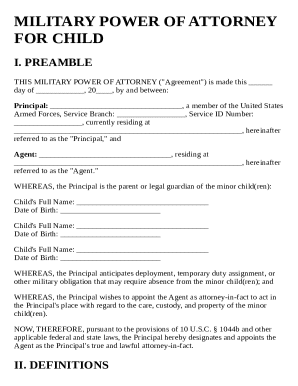
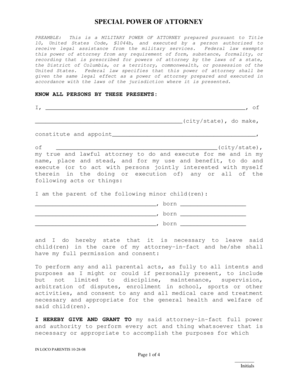
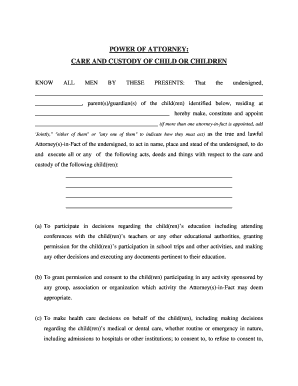
The DA Form 5841 Power of Attorney is a legal document used by members of the United States Armed Forces to designate a guardian for their child(ren) during their absence.
pdfFiller scores top ratings on review platforms




Kudos to Paul with customer support
Paul with customer support handled my concerns with speed, efficiency, empathy and without judgment. I will not hesitate to use PDF filler again in the near future.
A+
This is a great program. Very easy to use.
I liked the clear simple explanations.and the fact that it stops you from clicking on anything until it has explained the basic functions of the key attributes. For some of us who think they can probably figure it out on our own the little speed bump and wake up call save a LOT of time.
The the doc service. Its great!
So far so good. Easy to understand and use, and the features I use most.
Who needs DA 5841?
Explore how professionals across industries use pdfFiller.

DA 5841 is needed by:
-
Active-duty military personnel needing child guardianship.
-
Military families managing child care during deployment.
-
Guardians requiring authorization for medical and educational decisions.
-
Service members planning for family care arrangements.
-
Legal advisors assisting military clients with power of attorney.
Comprehensive Guide to DA 5841
What is the DA Form 5841 Power of Attorney?
The DA Form 5841 serves as a military power of attorney (POA) specifically designed for members of the U.S. Armed Forces. This essential document provides the ability to designate a guardian for children, ensuring their welfare during periods of absence. Notably, the form requires notarization to uphold its legal validity, aligning with legal standards for military families.
Purpose and Benefits of the DA Form 5841 Power of Attorney
The primary purpose of the DA Form 5841 is to designate a guardian who can take care of a military personnel's child(ren) when they are away. This appointment is crucial for the child's welfare, especially in urgent medical situations or when legal decisions need to be made swiftly. Furthermore, this power of attorney greatly simplifies aspects of child care planning for military families, providing peace of mind while fulfilling service duties.
-
Ensures children's welfare in the absence of military personnel.
-
Facilitates necessary medical treatments and legal matters.
-
Supports military families in organizing effective child care strategies.
Key Features of the DA Form 5841 Power of Attorney
This form includes several crucial features that streamline its use. First, it encompasses fillable fields such as 'Name,' 'State,' and 'Signature,' making it user-friendly for quick completion. Additionally, the requirement for notarization ensures that the document holds up in legal scenarios. The form's validity may vary based on the military service status, an important factor for service members to be aware of.
-
Fillable fields streamline data entry.
-
Notarization is necessary for legal effectiveness.
-
Validity tied to military service conditions.
Eligibility Criteria for the DA Form 5841 Power of Attorney
The eligibility to utilize the DA Form 5841 is primarily restricted to military personnel. They must meet certain criteria regarding age and eligibility concerning the children for whom guardianship is being established. Moreover, the designation of an Attorney-in-Fact must comply with specified allowable persons under military regulations to ensure proper legal standing.
-
Active military personnel can create the DA Form 5841.
-
Age restrictions may apply to listed children.
-
Allowed individuals for Attorney-in-Fact designation must be clarified.
How to Fill Out the DA Form 5841 Power of Attorney Online (Step-by-Step)
Filling out the DA Form 5841 online is made simple with platforms such as pdfFiller. Follow these step-by-step instructions to complete the form accurately:
-
Access the DA Form 5841 on pdfFiller's interface.
-
Fill in the required fields, including the names and state.
-
Review for any missing information or inaccuracies.
-
Ensure notarization is processed for legal recognition.
-
Submit the finalized form as instructed.
Common Errors and How to Avoid Them
Form completion errors can lead to unnecessary complications. Here are some common mistakes to avoid when filling out the DA Form 5841:
-
Failing to fill out all required fields completely.
-
Neglecting the notarization requirement.
-
Submitting an unsigned form.
Taking time to double-check all entries can help ensure a successful submission and minimize potential legal issues.
How to Sign or Notarize the DA Form 5841 Power of Attorney
Signing and notarization are crucial steps in finalizing the DA Form 5841. Users can opt for either digital or wet signature options, depending on the requirements of the overseeing military authority. To notarize the completed form, follow these steps:
-
Complete the form in its entirety.
-
Present the form to a notary public.
-
Ensure the notary completes their acknowledgment.
This notarization step is vital to uphold the legal validity of the power of attorney.
Where to Submit the DA Form 5841 Power of Attorney
Submitting the DA Form 5841 can be done through various authorized locations. Military personnel typically submit the form at designated military installations, but online submission options may also be available. Be sure to verify any associated fees or required documentation that must accompany the submission.
-
Locations include specific military installations.
-
Fees may be applicable depending on the submission method.
-
Confirmation of receipt can be expected based on processing times.
Sample or Example of a Completed DA Form 5841 Power of Attorney
For users unfamiliar with the completion process, reviewing a sample of a completed DA Form 5841 can be immensely helpful. This sample highlights important filled fields, providing clarity on what information needs to be entered. A comparison between a completed form and a blank version will also illustrate how each section should be accurately filled out.
Get Started with pdfFiller for Your DA Form 5841 Power of Attorney
pdfFiller offers an efficient platform for creating and editing the DA Form 5841. With capabilities for secure document handling, you can confidently manage sensitive information. Start effortlessly filling out the DA Form 5841 online today, ensuring all instructions and requirements are meticulously followed for successful completion.
How to fill out the DA 5841
-
1.To access the DA Form 5841 on pdfFiller, visit the pdfFiller website and use the search bar to locate 'DA Form 5841 Power of Attorney'.
-
2.Once you find the form, click on it to open in the pdfFiller editor, where you can begin filling out the necessary fields.
-
3.Before filling out the form, gather all required information, including the names of the children, the designated guardian's information, and any relevant medical or educational decisions that need to be authorized.
-
4.Use pdfFiller's intuitive interface to navigate through the fillable fields. Click on the areas labeled, such as 'Name' and 'State', then input the required information.
-
5.Make sure to review each section carefully. Verify that all data is accurate and that you have included any special instructions relevant to guardianship or care.
-
6.After completing the form, utilize the review function to ensure everything is in order. Check for any missing information and correct any errors if necessary.
-
7.When satisfied, save your completed form. You can download it as a PDF, print it directly, or email it to the required parties or institutions.
-
8.Remember to notarize the completed form to ensure its validity and keep a copy for your records.

Who is eligible to use the DA Form 5841?
The DA Form 5841 is specifically designed for active-duty members of the United States Armed Forces who need to establish a power of attorney for child care responsibilities.
Is there a deadline for submitting the DA Form 5841?
While there are no specific submission deadlines for the DA Form 5841, it is advisable to complete it well before any military deployment or extended absence to ensure proper guardianship arrangements.
How do I submit the completed DA Form 5841?
The completed DA Form 5841 can be submitted by providing the notarized copy to the designated attorney-in-fact and maintaining a copy for your records. Ensure relevant parties have access if needed.
Are there any supporting documents required?
No additional documents are required when filling out the DA Form 5841; however, having identification and any medical information relevant to the child(ren) will be beneficial for clarity.
What are common mistakes when filling out the form?
Common mistakes include leaving fields blank, not notarizing the document, or failing to use the current names of the children and guardian. Double-check all entries for accuracy.
How long does the DA Form 5841 remain valid?
The DA Form 5841 remains valid until it reaches its specified expiration date or is revoked under certain military status conditions, so be sure to keep track of these details.
Can I make changes to the DA Form 5841 after it is signed?
Changes can only be made by officially revoking the previous power of attorney and executing a new DA Form 5841. It's crucial to follow proper procedures for making amendments.
DA 5841 Form Versions
Related Content
Related Forms





Get the latest insights from our blog


If you believe that this page should be taken down, please follow our DMCA take down process
here
.
This form may include fields for payment information. Data entered in these fields is not covered by PCI DSS compliance.